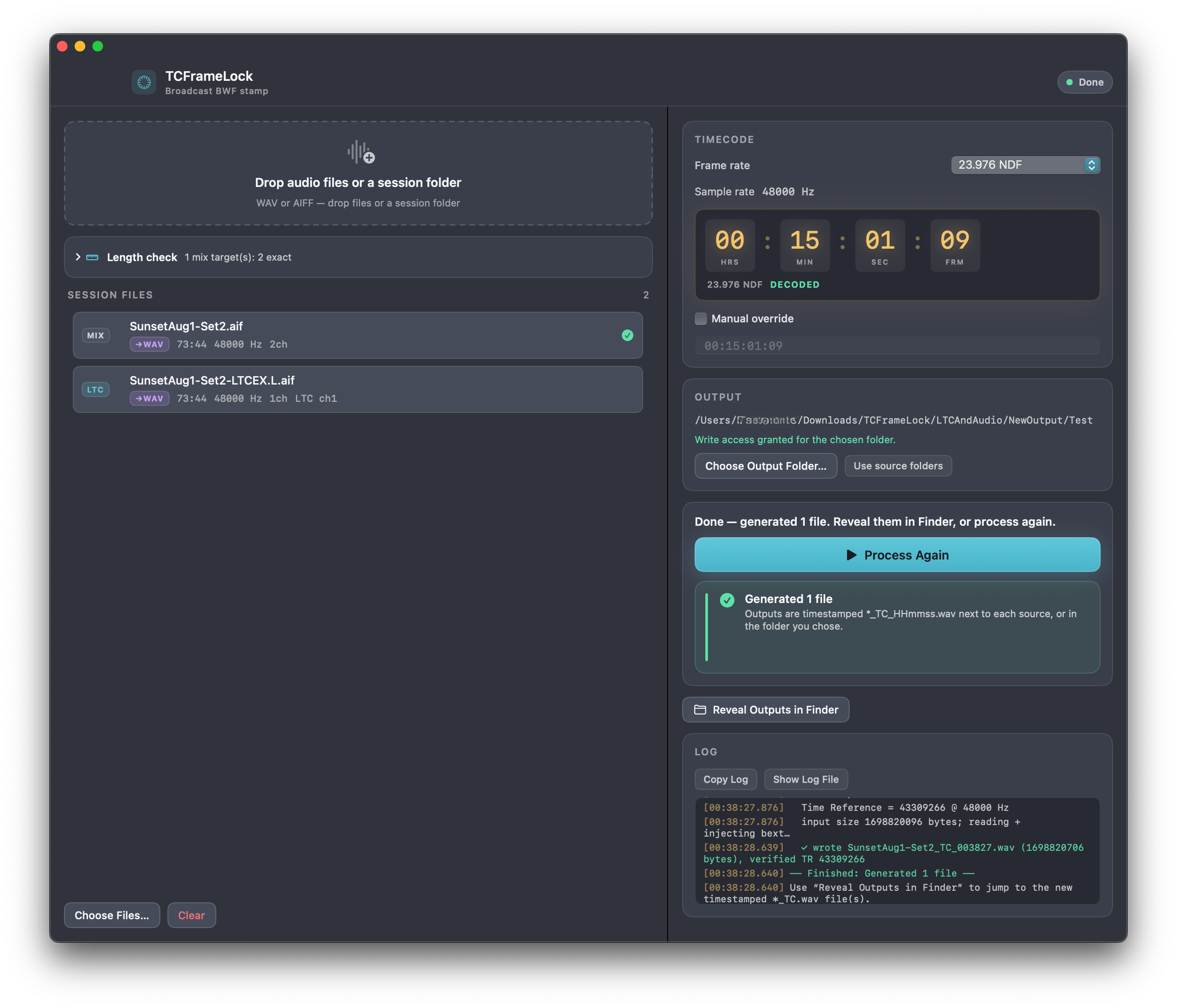
Write the session timecode into the files. Then insert them using that timecode.
If you have multitrack recordings and an LTC track alongside them, TCFrameLock writes that timecode into every audio track as Broadcast Wave. In your movie editor, insert them onto the timeline using the timecode. They land on the right frame. The audio is copied, not re-encoded.
You recorded several tracks, and one of them is Linear Timecode. You want those files on a movie timeline at the same place the camera was. TCFrameLock reads the LTC and writes that timecode into every audio track as Broadcast Wave. In the editor you insert them using that timecode so the new files land on the right frame.
Step 1
Drop the session
Your audio tracks plus the LTC. WAV or AIFF, or a whole folder. The app looks for the timecode track so you do not have to label it.
Step 2
It reads the LTC
That track is the clock that ran while you recorded. The app reads it and finds the timecode at the beginning of the session. Every audio track gets that same timecode.
Step 3
Insert using timecode
Each track comes back as a Broadcast WAV with that timecode already in the file. In the movie editor, insert them onto the timeline using that timecode. They land on the right frame.
From session to timeline
Drop the audio and the LTC that was recorded with it. These tabs walk through what the app does with those files, what you get back, and how the movie editor uses them.
Audio plus the LTC that ran with it
What you drop
This is a typical use. You have the tracks from the recorder, and one file is Linear Timecode recorded at the same time. Drop the files or the whole folder. The app looks for the LTC track so you do not have to label it.
Mix_L.wav 48 kHz · 24-bit
MIX
Mix_R.wav 48 kHz · 24-bit
MIX
Dialogue.wav 48 kHz · 24-bit
MIX
Session_LTC.wav LTC on channel 1
LTC
The LTC is the clock for the session
How they work together
That LTC file is not music. It is a clock that ran while you recorded. The app listens to it and reads the timecode off that track. The audio files get that same clock, so they stay together when you get to the editor.
01:00:00:03
01:00:00:04
01:00:00:05
01:00:00:06
01:00:00:07
01:00:00:08
01:00:00:09
01:00:00:10
Once it has a solid read of the LTC, every audio track can share that clock.
The beginning of the files, not a random hit in the middle
Where they belong
The first timecode the app hears might be a second into the recording. That is not where the files begin. It works back to the first sample so the timecode matches the actual beginning of the audio, which is what the movie editor needs.
00:59:59:10beginning of the file
01:00:00:10first LTC it locked onto
The timecode the movie editor will use
What gets written
Broadcast WAV files carry a timecode the editor can read. When you insert using timecode, that is what places the clip. Every audio track from the session gets the same one, taken from the LTC.
00HRS
:
59MIN
:
59SEC
:
10FRM
This is what the editor uses when you insert using timecode
New files, same audio, then the timeline
What you take to the editor
You get new Broadcast WAV files. The audio is the same. The LTC file is not rewritten. Bring those new files into your movie editor and insert them using the timecode. Each clip lands on the timeline at the right frame.
Same audio
Copied, not re-encoded. That is the recording you already have.
New Broadcast WAV
Each audio track comes back with the session timecode written in, so the editor can place it.
LTC left alone
It was only the clock. The app does not rewrite that file.
Insert using timecode
In the movie editor, that puts each clip on the timeline at the right frame.
1. Bring the session
Multitrack files plus the LTC that was recorded with them. Drop the files or a folder.
↓
2. It reads the LTC
That track is the clock that ran with the recording. The app reads it and writes that same timecode onto every audio track.
↓
3. It stamps every track
Each track gets a new Broadcast WAV with that timecode written in. Same audio. The LTC file is not rewritten.
↓
4. Insert using timecode
Bring the new files into your movie editor. Insert them onto the timeline using the timecode in the file. They land on the right frame.
Specs
Platform
macOS 14 or later, sandboxed native SwiftUI app
Inputs
WAV (RIFF) and AIFF / AIF, linear PCM
Outputs
Broadcast WAV with bext; filename *_TC_HHmmss.wav
Frame rates
23.976 NDF, 24, 25, 29.97 NDF, 29.97 DF, 30
Time Reference
EBU Tech 3285, UInt64 little-endian at bext offset 338
Originator
TCFrameLock, plus stamp date/time when creating a new bext
Not supported
RF64, compressed audio, files that would exceed the 4 GB RIFF limit
Network
None. Files never leave the Mac.
What you do with it
Sessions with an LTC track
Multitrack from the recorder, plus the Linear Timecode that was recorded with them. That is the whole job.
One clock for every audio track
The LTC is the clock. Every audio track comes back as a Broadcast WAV with that same timecode in the file.
Same audio
The sound is copied. You are not printing a new mix. The LTC file is only read, never rewritten.
Then the movie editor
In the movie editor, insert them using the timecode. Each clip lands on the timeline at the right frame.
On your Mac
No account, no upload. Files stay on the machine. Drop a session, get new files next to it or in a folder you choose.
WAV or AIFF
Drop files or a whole folder. The app looks for the LTC so you do not have to label it.
Buy TCFrameLock
One-time Mac license. Pay once, download, come back for updates.
License
$19.99 USD
Loading checkout…
macOS 14 or later. One license per checkout email. After you pay, your download is on the next screen.
The app does not upload files or analytics. Processing is on your Mac. Checkout is handled by Paddle. Privacy policy.
Requirements
macOS 14 or later.
Common questions
What does TCFrameLock do?
If you have multitrack recordings and an LTC track recorded with them, TCFrameLock writes that timecode into every audio track as Broadcast Wave. In your movie editor, insert them onto the timeline using that timecode. They land on the right frame. The audio itself is not re-encoded.
What is a Broadcast WAV Time Reference?
In the EBU bext chunk, Time Reference is a 64-bit integer: PCM samples since midnight (00:00:00:00) at the file’s sample rate. NLEs use it to place sample 0 on a known SMPTE address. The app does not write a human-readable HH:MM:SS:FF string as the alignment value. It writes the sample count those systems expect.
Does it re-encode the audio?
No. A native WAV is stamped by injecting or updating bext and copying the data chunk. AIFF is converted to a working WAV first so the rest of the pipeline can run; the original AIFF is left alone.
Does it change the LTC file?
No. The LTC source is read only. Audio tracks are written as new timestamped WAV files. Existing files are never overwritten.
What if two files both look like LTC?
The session is marked ambiguous. You pick the LTC source in the UI, or right-click a file and assign it. If nothing locks, you can still type a timecode by hand.
Which frame rates are supported?
23.976 NDF, 24, 25, 29.97 NDF, 29.97 drop-frame, and 30. Changing the picker re-analyzes the files. A mismatch with the LTC signal is a warning, not a silent rewrite.